ContainerSSH - Launch containers on demand
ContainerSSH is a modern SSH server that starts a new container for every SSH connection. Instead of granting direct access to a host system, it dynamically spins up a container when a user logs in, providing a secure, clean, and resource efficient environment.
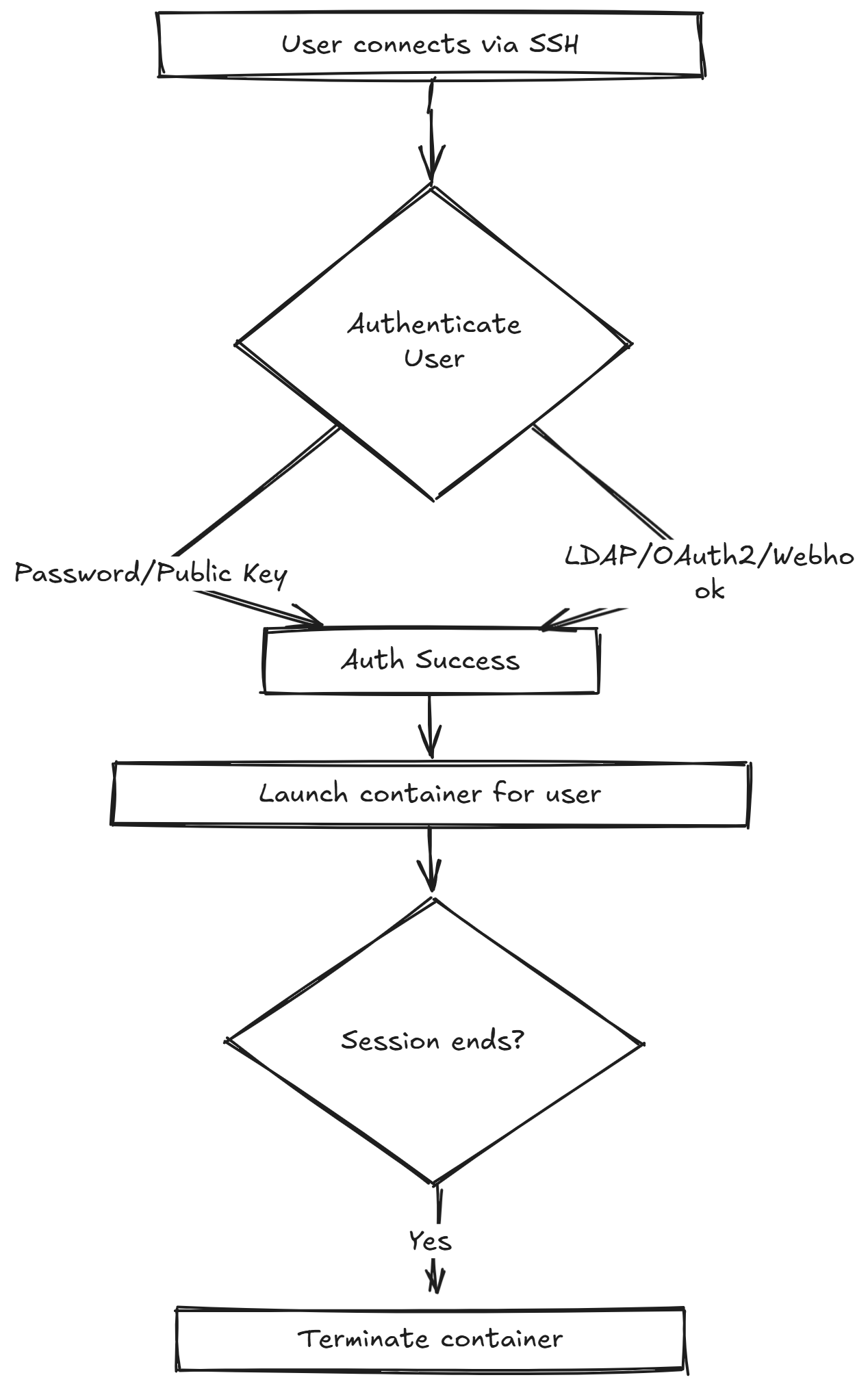
For every SSH connection, ContainerSSH automatically starts a fresh container, seamlessly drops the user into it, and removes the container when the session ends. There’s no need for system users, authentication and container configuration are handled dynamically via webhooks.
Key functionalities of ContainerSSH
Container-based SSH access: ContainerSSH launches a new, isolated container (in Kubernetes, Podman, or Docker) for each SSH session.
Dynamic authentication and configuration: ContainerSSH supports dynamic authentication and container configuration through webhooks, eliminating the need for system users and simplifying user management.
Automatic container lifecycle management: The container is created upon connection and automatically removed when the user disconnects, ensuring resource efficiency and security.
Customizable runtime behavior: You can configure the base image, command, environment variables, CPU/memory limits, volume mounts, and network settings per session or user.
Built-in observability with Prometheus: ContainerSSH exposes metrics like session count, container startup time, and errors in Prometheus format, allowing easy integration with Grafana dashboards for monitoring and auditing.
ConatinerSSH flow chart
Step-by-Step Walkthrough on implementation
I’ll now walk you through a quick demo to show how ContainerSSH works in practice. We’ll set up a simple environment using Docker Compose.
- Accepts any SSH connection
- Spins up a new container for each session
- Cleans up automatically when the session ends
The demo runs ContainerSSH with Docker Compose, along with a dummy auth server that accepts any login.
When you SSH to localhost:2222, a new container is started just for that session. After logout, the container is automatically removed showcasing secure, on-demand SSH access.
Prerequisites
To set this up, I already had:
Running Linux Server with docker service running.
Step 1: Clone the ContainerSSH example repo
1
2
3
4
5
6
7
8
9
10
11
12
13
14
15
16
17
[root@ip-172-31-16-220 ContainerSSH]# git clone https://github.com/ContainerSSH/examples.git
Cloning into 'examples'...
remote: Enumerating objects: 147, done.
remote: Counting objects: 100% (16/16), done.
remote: Compressing objects: 100% (15/15), done.
remote: Total 147 (delta 6), reused 1 (delta 1), pack-reused 131 (from 1)
Receiving objects: 100% (147/147), 39.73 KiB | 2.48 MiB/s, done.
Resolving deltas: 100% (69/69), done.

[root@ip-172-31-16-220 ContainerSSH]# cd examples/quick-start/
[root@ip-172-31-16-220 quick-start]# ls -ltr
total 24
-rw-r--r--. 1 root root 5948 Aug  3 06:35 kubernetes.yaml
-rwxr-xr-x. 1 root root  485 Aug  3 06:35 generate_keys.sh
-rw-r--r--. 1 root root 1724 Aug  3 06:35 docker-compose.yaml
-rw-r--r--. 1 root root  361 Aug  3 06:35 config.yaml
-rw-r--r--. 1 root root 2517 Aug  3 06:35 README.md
Step 2: Generate SSH keys for the container
1
2
3
4
5
6
7
8
9
10
[root@ip-172-31-16-220 quick-start]# sh generate_keys.sh
[root@ip-172-31-16-220 quick-start]# ls -ltr
total 36
-rw-r--r--. 1 root root  1724 Aug  3 06:35 docker-compose.yaml
-rw-r--r--. 1 root root   361 Aug  3 06:35 config.yaml
-rw-r--r--. 1 root root  2517 Aug  3 06:35 README.md
-rwxr-xr-x. 1 root root   349 Aug  3 06:38 generate_keys.sh
-rw-------. 1 root root  3422 Aug  3 06:38 ssh_host_rsa_key
-rw-------. 1 root root   452 Aug  3 06:38 ssh_host_ed25519_key
-rw-r--r--. 1 root root 11072 Aug  3 06:38 kubernetes.yaml
Step 3: Review config files
docker-compose.yaml
1
2
3
4
5
6
7
8
9
10
11
12
13
14
15
16
17
18
19
20
21
22
23
24
25
26
27
28
[root@ip-172-31-16-220 quick-start]# grep -v '^\s*#' docker-compose.yaml
---
services:
  containerssh:
    image: containerssh/containerssh:0.4.1
    ports:
      - 127.0.0.1:2222:2222

    volumes:

    - type: bind
      source: ./config.yaml
      target: /etc/containerssh/config.yaml

    - type: bind
      source: ./ssh_host_rsa_key
      target: /var/secrets/ssh_host_rsa_key
    - type: bind
      source: ./ssh_host_ed25519_key
      target: /var/secrets/ssh_host_ed25519_key

    - type: bind
      source: /var/run/docker.sock
      target: /var/run/docker.sock

    user: "root"
  authconfig:
    image: containerssh/containerssh-test-authconfig:0.4.1
config.yaml
1
2
3
4
5
6
7
8
9
10
11
12
13
14
15
16
17
[root@ip-172-31-16-220 quick-start]# grep -v '^\s*#'  config.yaml
---
ssh:
  banner: "Welcome to ContainerSSH!\n"
  hostkeys:
    - /var/secrets/ssh_host_rsa_key
    - /var/secrets/ssh_host_ed25519_key
log:
  level: debug
auth:
  url: "http://authconfig:8080"
configserver:
  url: "http://authconfig:8080/config"
backend: docker
docker:
  connection:
    host: unix:///var/run/docker.sock
Step 4: Launch ContainerSSH
1
2
3
4
5
6
7
8
[root@ip-172-31-16-220 quick-start]# docker-compose up -d
[+] Running 2/2
 ✔ Container quick-start-containerssh-1  Started                                                                                                        0.7s
 ✔ Container quick-start-authconfig-1    Running                                                                                                        0.0s
[root@ip-172-31-16-220 quick-start]# docker ps
CONTAINER ID   IMAGE                                             COMMAND                  CREATED          STATUS          PORTS                                NAMES
342ddfb03825   containerssh/containerssh:0.4.1                   "/containerssh --con…"   22 seconds ago   Up 21 seconds   127.0.0.1:2222->2222/tcp, 9100/tcp   quick-start-containerssh-1
7420939e09bf   containerssh/containerssh-test-authconfig:0.4.1   "/containerssh-testa…"   6 hours ago      Up 6 hours      8080/tcp                             quick-start-authconfig-1
Step 5: Logging in
Initiate a ssh connection on the localhost
1
2
3
4
5
6
7
8
9
[root@ip-172-31-16-220 ~]# ssh foo@localhost -p 2222
The authenticity of host '[localhost]:2222 ([127.0.0.1]:2222)' can't be established.
ED25519 key fingerprint is SHA256:kt3d+1BHstt3nWAqxSsL0MYZM2BhAlxQA/ZXkccuyCI.
This key is not known by any other names
Are you sure you want to continue connecting (yes/no/[fingerprint])? yes
Warning: Permanently added '[localhost]:2222' (ED25519) to the list of known hosts.
Welcome to ContainerSSH!
foo@localhost's password:
root@96b9d75fbda0:/#
Now we could check a new docker container is started.
1
2
3
4
5
[root@ip-172-31-16-220 quick-start]# docker ps
CONTAINER ID   IMAGE                                             COMMAND                  CREATED              STATUS              PORTS                                NAMES
96b9d75fbda0   containerssh/containerssh-guest-image             "/usr/bin/containers…"   About a minute ago   Up About a minute                                        focused_wiles
342ddfb03825   containerssh/containerssh:0.4.1                   "/containerssh --con…"   4 minutes ago        Up 4 minutes        127.0.0.1:2222->2222/tcp, 9100/tcp   quick-start-containerssh-1
7420939e09bf   containerssh/containerssh-test-authconfig:0.4.1   "/containerssh-testa…"   6 hours ago          Up 6 hours          8080/tcp                             quick-start-authconfig-1
Summary
This blog shows how easy it is to get started with ContainerSSH using Docker Compose. It gives you a hands-on at how on-demand, container-based SSH access works. Use cases include Developer Sandboxes, Training & Workshops, Lightweight Demo Environments.